
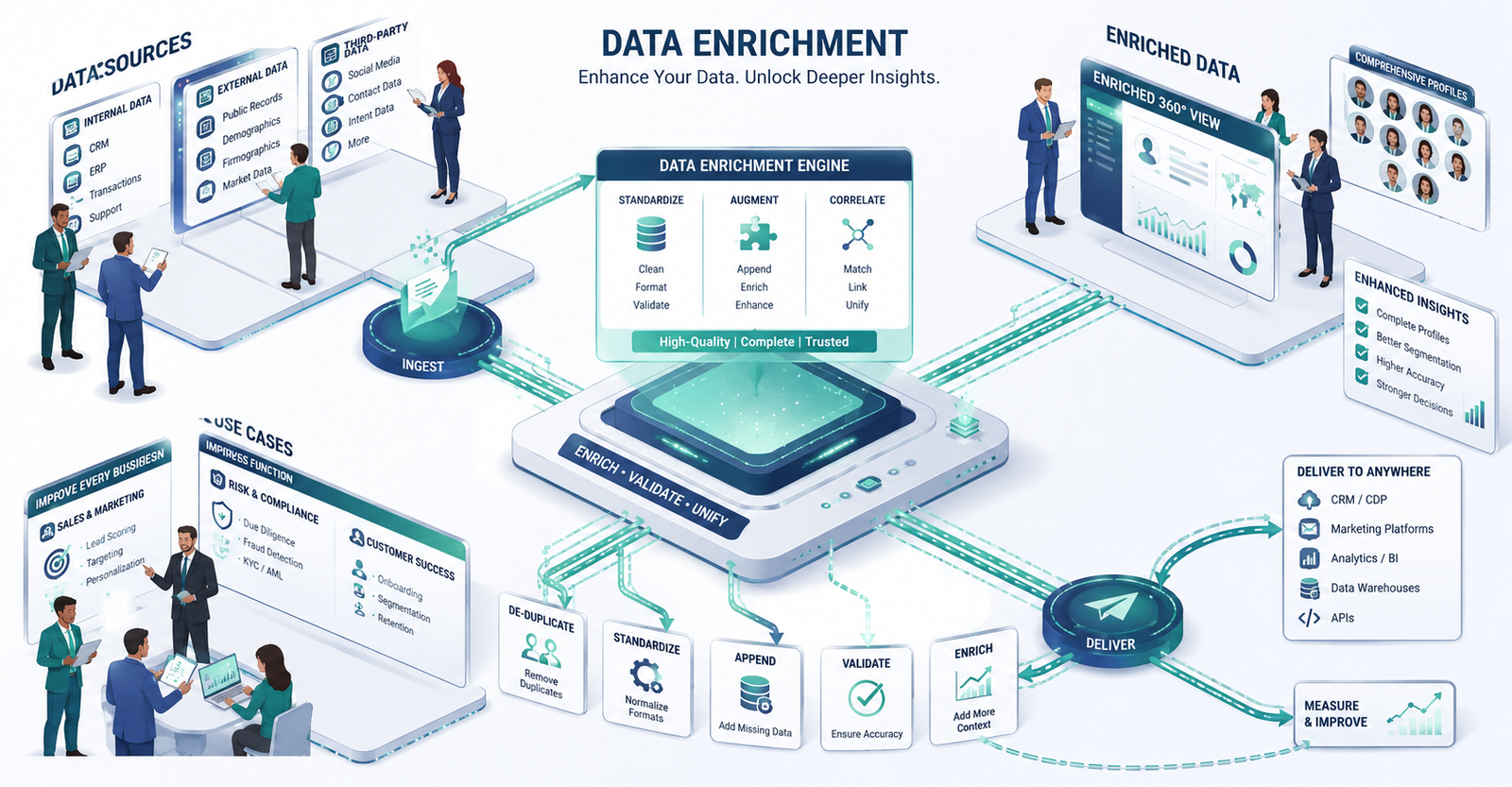
High-quality data is the foundation of any data-driven company. But raw data alone doesn’t tell you much. That’s why a proper data management system matters — and data enrichment sits at the center of it.
A 2025 report by the IBM Institute for Business Value found that 43% of chief operations officers identify data quality as their most significant data priority. Midsized companies often don’t feel the impact right away. Bad data rarely announces itself — it shows up quietly in missed pipeline targets, wasted campaign spend, and sales hours lost to manual research.
Different companies approach data enrichment differently, based on their needs and available sources. This blog breaks down what data enrichment is, how it works, and why it belongs in your business process.
What Is Data Enrichment?
Data enrichment is the process of adding new, useful information to your existing database. It updates outdated records, such as phone numbers, email addresses, and decision-maker contacts, while filling in gaps that limit what your team can do with the data.
The goal is not to replace what you already have. It is to make your existing data more complete and useful. Data enrichment works by combining internal first-party data with external third-party sources to build a fuller picture of each record.
First-party data is information collected directly from your audience, including customer interactions, website visits, and social media engagement. It is generally more reliable and serves as a valuable asset for your business.
Third-party data is aggregated by external providers that have no direct relationship with your users. It typically includes firmographic data, contact data, and intent data.
Data enrichment and data cleansing are related, but they are not the same. Data cleansing fixes errors, while data enrichment adds depth. Both are important, but they serve different purposes.
Examples of Data Enrichment
Marketing enrichment – Marketing teams add behavioral and interest data from platforms such as Facebook, Instagram, and LinkedIn to existing customer profiles. This helps create campaigns tailored to specific preferences rather than broadcasting a generic message to everyone.
Geographic enrichment – This adds location-specific data to existing records, such as postal codes, regional coordinates, and service area boundaries. Companies use this information to run location-based campaigns or evaluate whether expanding into a new market makes sense.
Firmographic enrichment – Firmographic data covers business-level details, including company name, location, industry, size, number of offices, years in operation, and ownership type. For B2B teams, this is often the most useful type of enrichment because it directly supports account segmentation.
Intent data – the advanced layer of enrichment – This category of enrichment goes beyond identifying who a company is and begins to reveal what it is actively interested in. Intent data provides insight into a buyer’s current needs by tracking signals such as content downloads and website visits. It helps identify when buyers are actively searching for a solution, even before they make contact.
Unlock More Value From Your Existing Data
Data Enrichment vs. Data Cleansing
These two get confused a lot, so it’s worth being clear about what each one does.
Data enrichment adds information. If a contact record has an email address but no phone number or LinkedIn profile, enrichment fills those gaps using a third-party source. The purpose is depth.
Data cleansing removes or corrects bad information — duplicate records, formatting errors, outdated entries. The purpose is accuracy.
There’s a third term worth knowing: data appending. This is the process of adding missing information from external sources to fill gaps in incomplete records. It often gets confused with enrichment, but the distinction is that appending targets what’s entirely missing, while enrichment adds context and depth to what already exists.
In practice, cleansing comes first. Think of it like renovating a house — before you upgrade the kitchen or add a new bathroom, you clear out the damaged materials. That’s cleansing. Then you bring in the improvements. That’s enrichment. Skipping the cleansing step and jumping straight to enrichment means you’re building on a broken foundation.
Benefits of Data Enrichment
1. Maintains data integrity — Data enrichment prevents duplicate records from entering your system and keeps your CRM organized. A cleaner database is easier to navigate and easier to trust.
2. Better segmentation — With richer data, your team can segment leads by job title, industry, geography, company size, or technology stack. The more specific your segments, the more relevant your outreach.
3. Risk management — Enriched data makes it easier to spot patterns that signal risk — unusual activity, inconsistent firmographic information, or contacts that don’t match the profile of your legitimate customer base.
4. Cost reduction — Poor data quality costs the average organization $12.9 million per year, according to Gartner. Data enrichment reduces wasted spend on outreach that goes nowhere because the underlying data was wrong.
5. Better customer experience — When your team understands customer behavior, preferences, and context, conversations improve. Sales reps stop pitching products a prospect already owns. Marketing stops sending campaigns that miss the mark by geography or industry.
6. Greater trust in the data — A record with a verified email, direct phone number, LinkedIn profile, and firmographic details feels reliable. That reliability means teams actually use the data rather than working around it.
Why Data Enrichment Is Necessary
A lot of businesses treat data enrichment as optional. It isn’t.
Around 30% of B2B contact data goes stale every year. Job changes, promotions, company restructuring, mergers — all of it moves the contacts your team is trying to reach. If you’re updating your database annually, you’re making decisions on data that’s already significantly degraded by the time you use it.
The Gartner figure — $12.9 million per year in losses from poor data quality — isn’t theoretical. It shows up in bounced emails, wasted sales hours, missed pipeline targets, and campaigns that generate no return. Data enrichment isn’t a nice feature. For businesses competing in crowded markets, it’s table stakes.
4 Signs Your Business Needs Data Enrichment
1. Basic information is missing from your records. If your database has email addresses but no phone numbers, industry tags, or company size data, your team is working with half the picture. A practical sign: your sales reps are promoting a product to a prospect who already bought it, because behavioral or account-level data was never captured.
2. Your sales reps are manually searching LinkedIn. If reps are spending time looking up prospects on LinkedIn to find a current job title or company name, that information should already be in your CRM. Time spent searching is time not spent selling.
3. Your marketing is generic. Campaigns that don’t account for industry type, geographic location, or company stage perform poorly — not because the message is bad, but because it’s going to the wrong people. Data enrichment gives marketing the context to segment properly.
4. Your email bounce rate is above 2%. A bounce rate over 2% usually means your list contains outdated or nonexistent email addresses. Major email service providers like Mailchimp and HubSpot flag or suspend accounts that exceed this threshold. That damages your sender reputation and reduces deliverability across your entire domain — not just for the bounced contacts.
Best Practices for Data Enrichment
1. Check your sources. Not all data providers are equal. Some don’t comply with international data regulations. Others aren’t built for business use. Before using a third-party enrichment source, verify it’s GDPR and CCPA compliant and suited to your use case.
2. Automate where you can. Manual enrichment doesn’t scale and introduces errors. Tools like ZoomInfo and Clearbit automate the process, reduce human error, and keep data current without requiring constant manual effort.
3. Define your goals before you start. Know which fields you’re trying to fill — contact-level data like phone numbers and job titles, company-level data like industry and revenue, or social data like LinkedIn profiles. Starting without a clear goal leads to enriching fields your team doesn’t actually use.
4. Update your CRM on a regular cadence. Data enrichment is not a one-time project. It’s an ongoing process. Standardizing your data format as part of the enrichment workflow keeps records consistent, searchable, and easy to work with across your stack.
5. Take data security and privacy seriously. Any organization handling external data should have clear policies in place before enrichment begins. Verify that your enrichment provider is GDPR and CCPA compliant, document where your data comes from, and review data quality at each stage of the process — not just at the end. A business that treats security as an afterthought creates liability for itself and for the contacts in its database.
The Data Enrichment Process: 6 Steps
Step 1: Assess your current data. Before adding anything, understand what you have. Identify the gaps, including fields that are missing, contacts that are incomplete, and records that haven’t been updated in over a year.
Step 2: Identify your data sources. Once you know the gaps, determine how to fill them. Internal sources might include CRM history or past purchase data. External sources include firmographic databases, geographic data providers, and enrichment platforms.
Step 3: Clean the data first. Remove duplicates, correct formatting errors, and standardize entries before enrichment begins. This is the renovation analogy in practice. Clear the damaged materials before adding new features.
Step 4: Integrate the external data. Combine your enriched data with your existing records. Make sure the integration maps fields correctly so new data lands in the right place rather than creating gaps or overwriting accurate information.
Step 5: Run quality assurance. After integration, check two things. First, accuracy, aim for at least 90% verified data across key fields. Tools like Data Ladder, Talend, and OpenRefine are built specifically for data quality management and can help you measure this. Second, relevance, make sure the enriched fields actually match your market. A US-focused company doesn’t benefit from enrichment that adds geographic data from markets it doesn’t serve.
Step 6: Monitor and refresh continuously. Data decays. Decision-makers change. Companies restructure. A single enrichment pass has a shelf life. Build a regular review cycle, quarterly at minimum, to keep your database current.
Turn Incomplete Data Into Actionable Intelligence
Final Thoughts
Data enrichment is not a one-time fix. It’s an ongoing process that compounds over time. The businesses that get the most from it treat it as a regular part of how they manage data — not a project they revisit every couple of years when conversion rates drop and bounce rates climb.
Frequently Asked Questions
1. What is data enrichment in simple terms?
Data enrichment is the process of adding missing or additional information to your existing database using external sources. For example, if you have a contact’s email address but not their phone number, job title, or company size, enrichment fills in those gaps.
2. How is data enrichment different from data cleansing?
Data cleansing removes or corrects inaccurate, duplicate, or outdated information. Data enrichment adds new information to existing records. In practice, cleansing comes first to fix what’s broken, followed by enrichment to make the clean data more complete.
3. How often should businesses enrich their data?
At minimum, quarterly. Around 30% of B2B contact data decays annually due to job changes, company restructuring, and other factors. Businesses that only update data annually are regularly making decisions on records that are already significantly outdated.
4. What data fields should I prioritize enriching?
Start with the fields that directly affect deliverability and segmentation: email address, direct phone number, job title, company name, industry, and company size. These have the most immediate impact on sales and marketing performance.
5. Is data enrichment GDPR compliant?
It can be, but compliance depends on your enrichment source. Any third-party data provider you use should be GDPR and CCPA verified. Always confirm the source’s compliance before integrating external data into your systems.
6. What tools are commonly used for data enrichment?
ZoomInfo, Clearbit, Lusha, and Apollo are among the most widely used B2B data enrichment platforms. Each has different strengths in terms of contact coverage, firmographic depth, and integration options.
7. How does data enrichment affect email marketing?
Enriched data reduces bounce rates by ensuring email addresses are current and valid. It also improves segmentation, which means campaigns reach the right audience rather than a broad generic list — resulting in better open rates and fewer spam complaints.
8. What is firmographic data enrichment?
Firmographic enrichment adds company-level details to your records — industry, size, location, revenue range, years in business, and ownership type. It’s useful for B2B teams that need to segment accounts by company profile rather than just individual contact details.
